Most people don’t get poor results from ChatGPT because the AI isn’t capable. They get poor results because their prompts leave too much room for interpretation.
A prompt is simply the instructions you give ChatGPT. The more clearly you explain what you want, the easier it is for the AI to produce a useful answer. That doesn’t mean every prompt needs to be long or technical.
Even small improvements, such as adding context or explaining your goal, can dramatically improve the quality of the response.
If you’ve ever asked ChatGPT something and received a vague, incomplete, or incorrect answer, learning how to write better prompts is one of the most valuable skills you can develop.
This guide explains what makes a good prompt, common mistakes beginners make, and practical techniques you can start using immediately.
Why Prompt Quality Matters
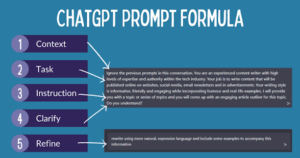
ChatGPT doesn’t read your mind. It works from the information you provide.
Imagine asking another person, “Help me write something.”
They would probably ask questions like:
- What are you writing?
- Who is it for?
- How long should it be?
- What tone do you want?
ChatGPT faces the same challenge. When important details are missing, it fills in the gaps using reasonable assumptions. Sometimes those assumptions match what you wanted. Often they don’t.
A better prompt reduces guessing.
Instead of spending time rewriting responses multiple times, you can often get much closer to your desired result with a well-written first prompt.
What Makes a Good ChatGPT Prompt?
Good prompts usually include four basic elements:
| Element | Why it matters | Example |
|---|---|---|
| Goal | Explains what you want | “Write a blog post” |
| Context | Gives background information | “The audience is small business owners.” |
| Requirements | Defines expectations | “Use simple English and keep it under 800 words.” |
| Format | Specifies how to present the answer | “Use Markdown headings and bullet points.” |
You don’t always need all four.
If you’re asking a simple factual question, a short prompt works perfectly. But for writing, coding, planning, research, or creative work, adding these details usually leads to much better results.
Start With a Clear Goal
The first sentence should tell ChatGPT exactly what you’re trying to accomplish.
Compare these prompts:
Poor prompt
Tell me about investing.
Better prompt
Explain the basics of stock market investing for someone with no financial background.
The second prompt immediately tells ChatGPT:
- the topic
- the experience level
- the type of explanation needed
That’s enough to produce a much more relevant answer.
Give Useful Context
Context helps ChatGPT understand your situation.
For example, if you’re asking for writing help, explain what you’re writing and who will read it.
Instead of this:
Write an email.
Try this:
Write a professional email to a client explaining that their project will be delayed by three days because we’re waiting for final approval.
The extra information changes the entire response.
The same principle applies to coding, studying, marketing, travel planning, and almost every other use case.
Explain Who the Audience Is
Many beginners forget this step.
The same topic should be explained differently depending on who will read it.
For example:
- elementary school students
- university students
- software developers
- business executives
- customers
- healthcare professionals
A prompt like this produces a much more appropriate response:
Explain cloud computing to high school students using simple examples.
Without specifying the audience, ChatGPT has to guess the level of complexity.
Be Specific About the Output
If you know what you want, say so.
Instead of asking:
Give me ideas.
Try something like:
Give me ten blog post ideas about home gardening. Each title should target beginners and include a short explanation.
Or:
Summarize this article in five bullet points.
Or:
Write a 600-word introduction using a friendly tone.
Specific instructions make the output easier to use without additional editing.
Tell ChatGPT the Role You Want It to Play
One useful prompting technique is assigning a role.
For example:
- Act as a career coach.
- Act as a technical support specialist.
- Act as a travel planner.
- Act as an experienced copywriter.
- Act as a mathematics tutor.
Roles encourage ChatGPT to focus on the knowledge and style most appropriate for the task.
For example:
Act as a hiring manager. Review my resume and identify weaknesses that could reduce my chances of getting an interview.
This produces more focused feedback than simply saying:
Review my resume.
Specify Tone and Writing Style
If you’re creating written content, mention the style you want.
Examples include:
- professional
- conversational
- friendly
- formal
- persuasive
- educational
- technical
- humorous
You can also describe what to avoid.
For example:
Write naturally using short paragraphs. Avoid marketing language and unnecessary jargon.
Small instructions like these often make a noticeable difference.
Include Constraints
Constraints tell ChatGPT what limits to follow.
Examples include:
- maximum word count
- reading level
- output format
- programming language
- deadline assumptions
- geographic location
- software version
For example:
Explain recursion in fewer than 300 words using simple language.
Or:
Write Python code that works with Python 3.12.
Constraints reduce ambiguity and make the response more practical.
Break Large Tasks Into Smaller Prompts
Many beginners try to accomplish everything with one enormous prompt.
That isn’t always the best approach.
Instead of asking ChatGPT to create an entire business plan in one request, work through the process step by step.
For example:
- Brainstorm business ideas.
- Evaluate the strongest options.
- Create a business model.
- Develop a marketing strategy.
- Build a financial forecast.
Each response can inform the next prompt.
This conversational approach usually produces more accurate and detailed results than trying to generate everything at once.
Ask for Structured Responses
If you know how you’d like the information organized, include that instruction.
For example:
Compare these laptops in a table.
Or:
List the pros and cons.
Or:
Explain the process using numbered steps.
Or:
Use Markdown headings.
Formatting instructions help produce responses that require less editing.
Give Examples When Possible
Examples remove ambiguity.
Suppose you want product descriptions that match a particular style.
Rather than describing the style, show one.
For example:
Use this product description as the style reference. Write descriptions for the remaining products using the same tone and structure.
Examples often communicate expectations better than lengthy explanations.
Tell ChatGPT What to Avoid
Negative instructions can be just as useful as positive ones.
For example:
Avoid technical jargon.
Or:
Don’t use bullet points.
Or:
Don’t invent information if you’re uncertain.
Or:
Avoid repeating the same ideas.
These instructions help prevent common problems before they appear.
Refine the Conversation Instead of Starting Over
One advantage of ChatGPT is that conversations build on previous responses.
If the first answer isn’t exactly right, you don’t need a completely new prompt.
Instead, refine it.
Examples include:
- Make it shorter.
- Add more examples.
- Explain this section in simpler language.
- Rewrite it for beginners.
- Remove unnecessary technical details.
- Expand the troubleshooting section.
Incremental improvements often save time compared to rewriting the original prompt.
Common Prompt Mistakes Beginners Make
Many disappointing responses come from a handful of common mistakes.
Asking Questions That Are Too Broad
A broad prompt produces a broad answer.
Instead of:
Tell me about AI.
Try:
Explain how generative AI creates text, using simple language for beginners.
The narrower prompt gives ChatGPT a clear direction.
Leaving Out Important Details
If you’re requesting code, mention the programming language.
If you’re writing an article, mention the audience.
If you’re requesting advice, explain your situation.
Missing context usually leads to generic responses.
Trying to Solve Too Many Problems at Once
Long prompts aren’t necessarily bad.
However, combining unrelated requests often reduces quality.
For example:
Write a blog post, create social media captions, design an email campaign, build a keyword strategy, and generate images.
Breaking these into separate prompts usually produces stronger results.
Assuming ChatGPT Knows Your Situation
ChatGPT only knows what you tell it within the conversation.
If you’re referring to a previous project, document, or dataset, provide the relevant details or upload the file when appropriate.
Otherwise, the AI may make incorrect assumptions.
Accepting the First Response Without Reviewing It
Even strong prompts don’t guarantee perfect answers.
Always check for:
- factual accuracy
- completeness
- missing details
- formatting issues
- logical consistency
Treat ChatGPT as an assistant rather than an unquestionable source.
Prompt Templates You Can Reuse
These templates provide a simple starting point.
Learning a New Topic
Explain [topic] for a beginner. Use simple language, practical examples, and avoid unnecessary technical terms.
Writing an Article
Write an article about [topic] for [audience]. Use a conversational tone, Markdown headings, short paragraphs, and practical examples. Keep it around [length].
Summarizing Information
Summarize the following text in five bullet points. Highlight the key ideas and remove unnecessary details.
Debugging Code
Here’s my code: [paste code]. Explain what’s causing the error, why it happens, and provide a corrected version with comments.
Comparing Products
Compare these products in a table. Include features, strengths, weaknesses, pricing differences, and who each product is best suited for.
Brainstorming Ideas
Generate 20 ideas for [topic]. Group similar ideas together and briefly explain each one.
These templates aren’t strict formulas. Think of them as frameworks you can adapt to your own needs.
Examples of Weak and Strong Prompts
Here are a few side-by-side comparisons.
| Weak Prompt | Strong Prompt |
|---|---|
| Write a blog. | Write a 1,500-word blog post about indoor plants for beginners. Use a friendly tone, Markdown headings, and practical care tips. |
| Fix my code. | Review this JavaScript function, explain why it returns undefined, and provide a corrected version with comments. |
| Help me study. | Create a seven-day study plan for learning algebra. Assume I have one hour available each evening. |
| Explain networking. | Explain computer networking for beginners using everyday examples instead of technical jargon. |
| Give me interview questions. | Generate 25 software engineering interview questions with model answers and difficulty ratings. |
Notice that the stronger prompts remove uncertainty.
When Short Prompts Are Enough
Not every prompt needs multiple paragraphs.
Simple questions often work perfectly well.
For example:
- What’s the capital of Japan?
- Convert 20 miles to kilometers.
- Explain what RAM does.
- Translate this sentence into Spanish.
- Define recursion.
Adding unnecessary instructions to straightforward requests usually doesn’t improve the result.
Reserve detailed prompts for complex tasks where context matters.
Build Better Prompts Through Iteration
Writing effective prompts is a skill that improves with practice.
After receiving a response, ask yourself:
- Did ChatGPT understand my goal?
- Was anything missing?
- Did I provide enough context?
- Could I be more specific?
- Would an example have helped?
Small adjustments often produce significantly better results than rewriting everything from scratch.
Over time, you’ll naturally learn which details matter most for different kinds of tasks, whether you’re writing articles, generating code, studying, planning projects, or analyzing information.
Final Thoughts
Learning how to write better ChatGPT prompts for beginners isn’t about memorizing complicated formulas. It’s about communicating clearly.
Start by stating your goal, provide the context ChatGPT needs, explain who the output is for, and specify any important requirements or formatting preferences. Review the response, then refine your prompt if necessary.
As you practice, you’ll spend less time correcting responses and more time getting useful answers on the first attempt. Clear prompts lead to clearer results, making ChatGPT a far more effective tool for learning, writing, problem-solving, and everyday tasks.
Related Articles
- How to Use ChatGPT to Summarize PDF Documents
- How to Generate Meeting Notes With AI for Free
- How to Use AI to Organize Daily Tasks Without Making Your Day More Complicated
- AI Tools for Creating Presentations Without PowerPoint
If you think there’s been a mistake here, please do let us know by commenting on this post or Contact Us. And a member of our Content Integrity Team will review this decision with you.