Learning how to optimize iPhone charging habits can help slow down battery aging and reduce the chances of dealing with poor battery life earlier than expected. Every rechargeable lithium-ion battery gradually loses capacity over time, but heat, charging patterns, and how the iPhone is used while charging can affect how quickly that happens.
The goal is not to keep your iPhone at a perfect battery percentage all day or follow unnecessarily strict charging rules. Modern iPhones have built-in battery management features designed to protect the battery. The most useful approach is to understand what actually causes battery wear and adjust the habits that have the biggest impact.
Understand What Actually Affects iPhone Battery Health
Your iPhone uses a lithium-ion battery. These batteries are designed to be recharged regularly, but their ability to hold a charge slowly decreases as they age.
Battery wear is influenced by several factors:
- The number of charge cycles the battery completes
- Exposure to high temperatures
- Spending long periods at very high charge levels
- Heavy use while the device is generating heat
- The battery’s age and chemical condition
A charge cycle does not mean plugging your iPhone in once. One cycle represents using a total amount of battery equal to 100 percent of its capacity. For example, using 50 percent of the battery one day and another 50 percent the next day roughly equals one complete cycle.
This is why constantly worrying about small charges is unnecessary. Charging from 40 percent to 70 percent does not create a full charge cycle by itself. Partial charging is normal for lithium-ion batteries.
The bigger concern is heat. If you want to optimize your iPhone charging habits, reducing unnecessary heat during charging is generally more important than trying to follow an exact percentage rule.
Avoid Letting Your iPhone Get Too Hot While Charging
High temperatures can accelerate battery degradation. An iPhone may become warm during charging, especially when using fast charging or wireless charging, but excessive or prolonged heat is not ideal.
Avoid charging your iPhone in places such as:
- Direct sunlight
- A hot car
- Under a pillow or blanket
- On top of another device that produces heat
- Poorly ventilated spaces
A common mistake is placing the iPhone on a bed and covering it with bedding while it charges overnight. The charger and battery both generate some heat, and insulating the device prevents that heat from dissipating properly.
If your iPhone becomes unusually hot, remove anything that may be trapping heat around it. A thick case can sometimes contribute, particularly during fast charging, gaming, video recording, or wireless charging.
You do not need to remove the case every time you charge the phone. However, if the device consistently becomes hot while charging, testing it without the case can help determine whether heat retention is part of the problem.
You Do Not Need to Drain the Battery to Zero Percent
Older battery technologies sometimes required users to completely discharge the battery. That advice does not apply to modern iPhone lithium-ion batteries.
You can charge your iPhone before it reaches 0 percent. In fact, regularly allowing the battery to drain completely is not necessary for maintaining battery health.
If your battery reaches 20 or 30 percent and you have access to a charger, it is perfectly fine to recharge it. Likewise, short charging sessions during the day are not inherently harmful.
There is also no requirement to unplug the phone at exactly 80 percent every time. Battery management is more complicated than a single percentage, and trying to maintain a strict range can become inconvenient without providing a meaningful benefit for every user.
A practical habit is to charge when it fits your routine while avoiding unnecessary extremes when possible. If you know you will not need a full battery, stopping before 100 percent can reduce the amount of time the battery spends fully charged. But if you need 100 percent to get through a long day, charging fully is the sensible choice.
Battery health should support how you use the phone, not force you to constantly manage it.
Turn On Optimized Battery Charging
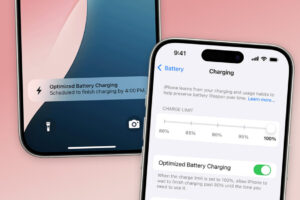
One of the most useful features for improving long-term charging habits is Optimized Battery Charging. This feature is designed to reduce the time your iPhone spends sitting at 100 percent.
When enabled, the iPhone can learn aspects of your charging routine. For example, if you regularly charge overnight, the phone may charge to around 80 percent, pause, and then complete the remaining charge closer to the time it expects you to use the device.
This reduces the amount of time the battery remains fully charged.
To check the setting:
- Open Settings.
- Tap Battery.
- Select Charging or Battery Health & Charging, depending on your iPhone and iOS version.
- Make sure the available optimized charging feature is enabled.
The exact wording and location can vary between iPhone models and iOS versions.
Optimized Battery Charging may not activate immediately after you turn it on. The feature works best when the iPhone has enough opportunity to recognize a consistent charging routine.
If your schedule changes frequently, such as charging at different times every day, the feature may have fewer opportunities to predict when you will unplug the phone.
Consider Using an 80 Percent Charge Limit When It Fits Your Routine
Some newer iPhone models and recent versions of iOS provide a Charge Limit option that allows you to limit charging below 100 percent.
This can be useful for people who spend much of the day near a charger and do not need the maximum possible battery runtime. Keeping the battery from remaining fully charged for extended periods may help reduce long-term stress associated with high charge levels.
You can usually find the setting by opening:
Settings > Battery > Charging
Available options depend on your iPhone model.
An 80 percent limit is not automatically the best setting for everyone. If you regularly leave home for long periods, travel frequently, or use battery-intensive apps, limiting the charge may simply result in your phone running out of power sooner.
Use a lower charge limit when the reduced battery capacity fits your daily needs. Switch back to a higher limit when you need more runtime.
This is a better approach than treating 80 percent as a universal rule.
Overnight Charging Is Generally Fine
Many people worry that leaving an iPhone connected overnight will overcharge the battery. Modern iPhones are designed to manage charging after the battery reaches its target level.
The phone does not continuously force energy into the battery in the same way throughout the night. Charging management and features such as Optimized Battery Charging are designed to reduce unnecessary battery stress.
That said, overnight charging can still expose the phone to heat if the charging environment is poor.
For safer overnight charging habits:
- Place the iPhone on a hard, open surface.
- Avoid covering it with pillows or blankets.
- Use a reliable charger and cable.
- Keep the device away from direct heat.
- Enable the available optimized charging features.
If you use a wireless charger overnight, pay particular attention to heat. Wireless charging can produce more heat than wired charging in some situations because energy is transferred inductively and some energy is lost during the process.
Proper alignment also matters. A poorly positioned phone may charge less efficiently and generate additional heat.
Use Reliable Chargers and Cables
The charger does not need to come directly from Apple, but it should meet appropriate safety and compatibility standards.
Poor-quality chargers and damaged cables can create several problems, including unreliable charging, overheating, or inconsistent power delivery.
If you are using a USB-C power adapter, the iPhone and charger communicate to determine an appropriate charging level. Using a higher-capacity adapter does not automatically mean the iPhone receives unlimited power. The device draws power within the limits it supports.
Fast charging can generate more heat than slower charging, especially during the earlier part of the charging process. This does not mean fast charging is unsafe when using compatible equipment, but if battery longevity is your highest priority and you are not in a hurry, slower charging may produce less heat.
The best choice depends on the situation.
Use fast charging when you need to recharge quickly. Use standard charging when speed is not important. There is little value in avoiding fast charging completely if it regularly makes your phone less practical to use.
Avoid Heavy Tasks While the iPhone Is Charging
Using your iPhone while charging does not automatically damage the battery. However, demanding activities can increase the temperature of the device.
Tasks that may generate significant heat include:
- Playing graphics-intensive games
- Recording long videos
- Editing video
- Using navigation for extended periods
- Streaming while connected to a weak mobile signal
- Running processor-intensive apps
When these activities occur while the phone is also charging, the combined heat can be higher than during normal charging.
If possible, allow the iPhone to charge without performing demanding tasks. This is especially useful during fast charging or wireless charging, when the device may already be warmer than usual.
Normal activities such as reading messages, browsing the web, or checking email are generally less demanding.
Do Not Obsess Over Charging From 20 to 80 Percent
Advice about keeping a battery strictly between 20 and 80 percent is common, but it is often presented too rigidly.
Avoiding extreme charge levels can be useful when practical, but your iPhone is meant to be used. Constantly unplugging and reconnecting it to maintain an exact percentage can create more inconvenience than benefit.
A more realistic approach is:
- Charge before the battery becomes critically low when convenient.
- Avoid leaving the phone completely drained for long periods.
- Do not worry about occasional full charges.
- Reduce the amount of time spent at 100 percent when a lower charge limit is practical.
- Prioritize keeping the phone cool.
The occasional trip to 5 percent or overnight charge to 100 percent is not likely to determine the future of your battery by itself. Long-term battery health is affected by cumulative usage, temperature, age, and charging patterns.
Consistency matters more than perfection.
Check Your iPhone’s Battery Health
Your iPhone provides information about battery condition through the Battery settings.
Depending on the device and iOS version, you can check battery health by going to:
Settings > Battery > Battery Health & Charging
or, on newer software:
Settings > Battery > Charging
Look for information about maximum capacity and battery performance.
Maximum Capacity compares the battery’s current charge capacity with its capacity when new. A lower number is expected as the battery ages.
A decrease in maximum capacity does not necessarily mean there is a problem. Battery capacity naturally declines over time, and two iPhones with similar ages can show different results because their temperatures, charging habits, usage patterns, and environments are different.
Pay attention if you notice a combination of poor battery life, unexpected shutdowns, charging problems, or a battery service recommendation.
Battery Health is useful, but it should not become the only measure of whether the battery needs attention. A phone with a lower capacity percentage may still provide acceptable daily battery life, while a phone with a higher percentage can still feel inconvenient if the user’s workload is particularly demanding.
Be Careful When Charging an iPhone for Long-Term Storage
If you plan to store an iPhone for several weeks or months, do not leave it completely empty or permanently connected to a charger.
A moderate charge level is generally preferable for storage. Around half charge is a practical target.
Before storing the phone:
- Charge it to approximately 50 percent.
- Turn it off if you will not use it for an extended period.
- Store it in a cool, dry environment.
- Avoid leaving it in direct sunlight or a hot vehicle.
- Check the battery periodically if the storage period is very long.
A completely discharged battery can become difficult to recharge if it remains empty for an extended time. High temperatures during storage can also contribute to battery aging.
Understand When a Battery Problem Is Not Caused by Charging Habits
Poor battery life is not always a battery health problem.
An iPhone may lose power quickly because of:
- A recently installed iOS update
- Background app activity
- Poor cellular coverage
- High screen brightness
- Location services
- A malfunctioning app
- Heavy use of mobile data
- An aging battery
If battery life suddenly becomes much worse, check which apps are consuming power before assuming the battery itself is failing.
Go to Settings > Battery to review battery usage. This can help identify apps that are consuming an unusually large amount of power.
After a major software update, temporary background tasks such as indexing and synchronization can also affect battery life. If the problem appears immediately after an update, monitor the phone for a while before making major changes.
However, persistent overheating, severe battery drain, unexpected shutdowns, or charging failures should not simply be dismissed as normal battery aging.
Common Charging Habits That Cause Unnecessary Battery Stress
The following habits are worth avoiding because they can contribute to heat, inefficient charging, or unnecessary battery strain:
Charging in hot environments
Heat is one of the clearest avoidable sources of battery stress. Move the phone to a cooler location before charging if possible.
Using damaged or unreliable accessories
Replace cables that are visibly damaged or chargers that repeatedly disconnect, overheat, or behave inconsistently.
Leaving a dead iPhone uncharged for long periods
Recharge the phone when possible rather than storing it at 0 percent.
Repeatedly overheating the phone during charging
If the phone consistently becomes very hot, investigate the cause. Check the charging accessory, case, charging surface, background activity, and surrounding temperature.
Treating battery percentages as strict rules
There is no need to panic if your iPhone reaches 100 percent or occasionally falls below 20 percent. Practical, sustainable habits are more useful than constantly monitoring the battery percentage.
A Practical Daily Charging Routine
For most people, an optimized routine can be simple.
Charge your iPhone whenever necessary, preferably in a cool environment. Keep Optimized Battery Charging enabled, and use a charge limit if your iPhone supports one and you do not need a full battery every day.
Use reliable accessories and avoid covering the phone while it charges. If the device becomes unusually hot, stop and determine why rather than continuing to charge it under the same conditions.
When you need fast charging, use it. When you are charging overnight, allow the iPhone’s battery management features to do their job.
The most sustainable charging routine is one that protects the battery without making the phone difficult to use.
Conclusion
Knowing how to optimize iPhone charging habits does not require following complicated rules or constantly keeping the battery between exact percentages. The most effective approach is to reduce unnecessary heat, avoid poor-quality charging accessories, use Apple’s built-in charging management features, and choose a charge limit only when it suits your daily battery needs.
Full charges, overnight charging, and occasional low battery levels are normal parts of using an iPhone. What matters more is the pattern over time. Keep the device cool, avoid unnecessary battery extremes when practical, and let the charging features built into the iPhone handle much of the routine management.
A battery will eventually lose capacity because that is how lithium-ion batteries work. Good charging habits cannot stop that process, but they can help avoid unnecessary stress while allowing you to use your iPhone normally.
If you think there’s been a mistake here, please do let us know by commenting on this post or Contact Us. And a member of our Content Integrity Team will review this decision with you.